

Streaming in Launch
Streaming Support in Contentstack Launch transfers data incrementally from your deployed applications (SSR pages, Cloud Functions, or Edge Functions) to clients without waiting for the full response to complete.
This feature is designed for use cases such as server-sent events (SSE), chunked transfer encoding (CTE), AI/LLM streaming responses, and progressive rendering, allowing you to deliver content incrementally and reduce perceived latency.
Streaming works over standard HTTP protocols and leverages Launch’s edge and serverless infrastructure to ensure low-latency delivery across global regions. Since Launch operates on a CDN-backed architecture with serverless runtimes, it handles streaming responses efficiently while maintaining scalability and performance.
What You Will Learn
When to use streaming for AI or LLM responses, SSE, CTE, and progressive rendering.
How to enable streaming during project creation, environment creation, or redeploy.
The execution timeout, authentication support, and limitations that apply to streaming.
Use Cases
Use streaming in the following scenarios:
- AI/LLM streaming responses: Deliver incremental model output to users as it is generated, reducing perceived wait time.
- Server-sent events (SSE): Push real-time updates from the server to the client over a persistent HTTP connection.
- Chunked transfer encoding (CTE): Send large responses in chunks without buffering the full payload.
- Progressive rendering: Stream HTML or data to the browser incrementally to improve time-to-first-byte and perceived performance.
Note: Streaming responses are forwarded as generated by your application. Launch does not buffer, modify, or transform streamed chunks. Ensure sensitive data is handled appropriately before streaming.
This step-by-step guide lets you enable streaming in Contentstack Launch to deliver your application responses progressively to clients in real time instead of waiting for the complete response before sending it.
Prerequisites
- Contentstack account
- Launch-enabled Organization with permissions
Steps for Execution
You can enable Streaming Responses at different stages of your project setup. Follow the steps for your preferred method:
- Enable streaming on project creation
- Enable streaming on environment creation
- Enable streaming on redeploy
Enable Streaming on Project Creation
- Perform the steps to create a new project using GitHub, Bitbucket, or by uploading a file.
- While performing the steps, in the Create New Project modal, select a response mode in the Build and Output Settings section.
- Once all details are configured, click Deploy to create your project with Streaming Responses enabled.
Enable Streaming on Environment Creation
- Perform the steps to create a new environment.
- While performing the steps, in the Create New Environment modal, select a response mode in the Build and Output Settings section.
- Once all details are configured, click Create to create your environment with Streaming Responses enabled.
Enable Streaming on Redeploy
- From the Launch landing page, select your project.
- On the top panel, click the Settings icon.
- Go to Environments > Deployments.
- Select a response mode:
- Streaming: Delivers response chunks in real time as they are generated.
- Buffered: Displays output only after the entire response has been generated.
Note: Buffered is selected by default.
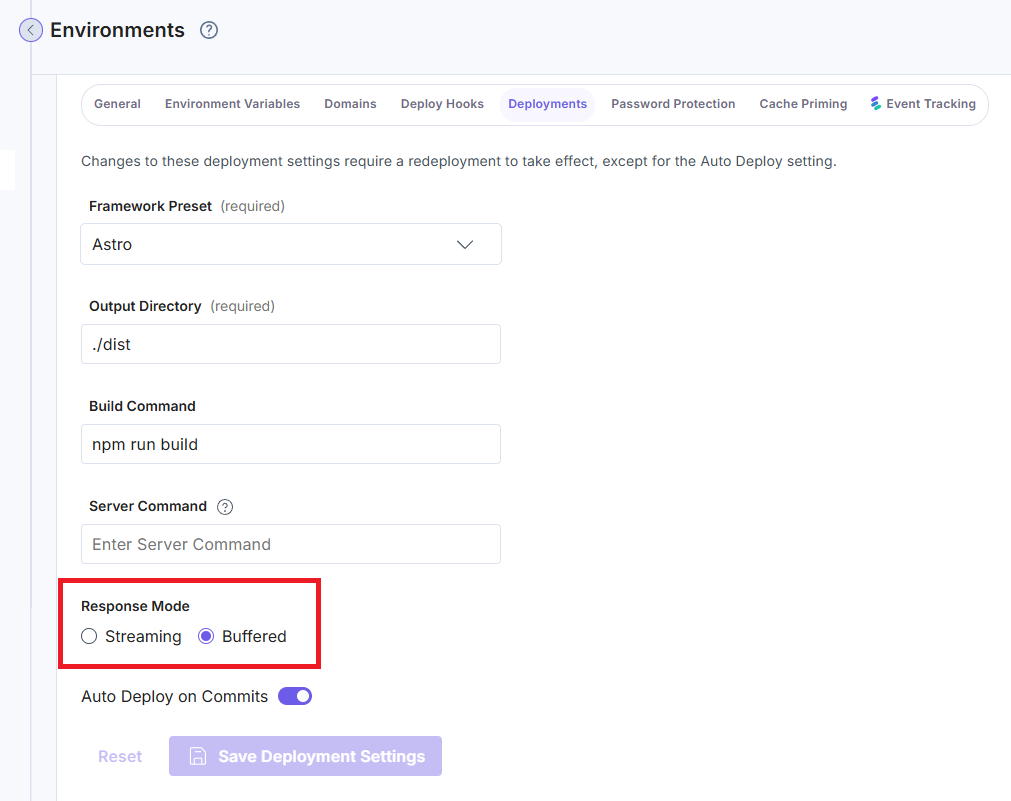
- Click Save Deployment Settings.
- On the top panel, click the Environments icon.
- Select your environment and redeploy.
Note: Enabling streaming at the platform level does not guarantee streaming behavior. If the application does not emit partial responses (flush/chunks), the platform will buffer the entire response and send it at once.
Execution Timeout
Launch enforces a maximum request timeout of 30 seconds for streaming responses. This means that a streaming request can remain active for a maximum of 30 seconds from the time the request is received. After the timeout is reached, the connection will be terminated and no further streamed response chunks will be delivered to the client.
Authentication in Streaming Mode
Basic Authentication
Streaming endpoints support Basic Authentication using the standard WWW-Authenticate response header. Return a 401 with WWW-Authenticate: Basic realm="…" from your endpoint and the browser will prompt for credentials.
Limitations
- Hop-by-hop headers are not supported
Headers such as Proxy-Authenticate, Connection, Transfer-Encoding, Keep-Alive, Upgrade, and others are managed by the underlying infrastructure and will not be forwarded in streaming responses.
- Proxied chunked streams may be buffered
When Launch proxies external streaming HTTP responses, the underlying infrastructure or runtime may buffer the response before forwarding it to the client if the upstream emits very small chunks at high frequency.
This behavior primarily affects:
- Non-SSE streaming responses (text/plain, generic chunked streaming)
- Short-lived, high-frequency chunk streams proxied from external origins
Note: This limitation does not apply to streams generated directly inside Edge Functions without an external fetch() call.
Tip: For real-time streaming use cases such as AI/LLM responses, live updates, or progressive content delivery, Contentstack recommends using Server-Sent Events (SSE) with Content-Type: text/event-stream.
Edge runtimes and proxies handle SSE streams more reliably. Standard proxied chunked streaming also works for many workloads, but behavior may vary depending on chunk frequency and the underlying edge runtime.
More articles in "Launch Features"
